

CE Mortise Lock Declaration of Performance Guide: How to Match the DoP, Certificate and Model Scope
Published: | Technical review required before publication
TL;DR: What Must Match Before You Approve a CE Mortise Lock?
- A Declaration of Performance is not interchangeable with a certificate, test report, product datasheet or CE logo.
- Match the legal manufacturer, product type, exact model, function, intended use, standard reference and declared performance across the complete document set.
- Check the certificate annex or model list. A similar family name, centre distance or photograph does not prove that an ordered model is covered.
- Connect the approved documents to the technical drawing, sample label, purchase order and production release record.
- Recheck the evidence after a change to the model suffix, backset, function, material, component, production process or manufacturing location.
- For product-family orientation, review the TOPTEK EN 12209 mortise lock range, but confirm every order against the current controlled documents.
Quick Answer: How Do You Check a CE Mortise Lock Declaration of Performance?
A CE mortise lock Declaration of Performance should be checked by tracing the exact product identity through the DoP, applicable certificate or annex, CE marking information, technical drawing, sample and purchase order. The manufacturer name, model reference, intended use, applicable technical specification and declared performance must form one consistent evidence chain.
The European Commission explains that the Construction Products Regulation provides a common technical language for construction-product performance and that the Declaration of Performance communicates that performance. However, buyers must still establish which regulatory and technical route applies to the specific product and market.
Key Takeaways for Door Manufacturers, Importers and Project Buyers
- Approve an identifiable product, not a generic document package.
- Use the complete model reference, including suffixes that identify function or construction.
- Record the document number, revision, issue date and model-list page used for approval.
- Do not extend certificate or fire-test scope based only on physical similarity.
- Freeze the approved document set before sample approval and mass production.
- Open a new review whenever the approved product or its supporting evidence changes.
What Is a CE Mortise Lock Declaration of Performance?
A Declaration of Performance, commonly called a DoP, is a manufacturer-controlled declaration used to communicate the performance of a construction product under the applicable regulatory and harmonised technical route. It is different from a laboratory report and different from a certificate issued within an assessment and verification process.
The DoP normally identifies the product type, manufacturer, intended use, applicable technical specification, assessment system and declared performance. Depending on the applicable regulatory route and transition timetable, project documentation may use terminology introduced by the newer European construction-products framework. Regulation (EU) 2024/3110 introduces a Declaration of Performance and Conformity within that framework.
Buyers should not automatically rename, replace or reinterpret a controlled DoP. They should record which regulation, harmonised technical specification and document format apply to the product being placed on the relevant market. The responsible manufacturer, notified body where applicable, importer and project compliance professional should resolve any transition question.
For an overview of the regulatory framework, see the European Commission Construction Products Regulation page.
Which Five Identifiers Must Agree Across the Document Package?
1. Legal Manufacturer
The legal entity shown in the declaration should be consistent with the responsible manufacturer identified in the associated certification and product marking. A brand name alone may not be enough if the documents identify a different legal entity.
2. Product Type and Exact Model Reference
Record the complete product reference. Do not shorten EN5572SL, for example, to “72 mm sash lock” during approval. Centre distance describes one dimension; it does not uniquely identify function, backset, construction or evidence scope.
3. Intended Use
The intended use establishes the application for which performance is declared. A lock intended for a general commercial door and a lock proposed for a fire or smoke door can require different supporting evidence and approval decisions.
4. Technical Specification and Edition
Check the standard reference exactly as written on the controlled document. EN 12209 addresses mechanically operated locks, latches and locking plates, but a buyer should not silently replace the edition stated in a certificate or DoP with the newest catalogue edition. Confirm the applicable harmonised reference and transition position with the responsible compliance party. A current catalogue reference can be checked through the BSI EN 12209 information page.
5. Declared Performance and Classification
The performance or classification information must belong to the approved product type. Do not copy a classification from a related model, marketing page or test summary without confirming its controlled documentary basis.
The CE Mortise Lock Evidence Stack
The following table separates documents that buyers often combine incorrectly.
| Evidence layer | What it should establish | Buyer verification |
|---|---|---|
| DoP or applicable declaration format | Product identity, intended use, technical basis and declared performance | Match document number, revision, manufacturer and product type |
| CE marking information | Traceable marking information connected to the declared product | Compare the label or marking layout with the controlled declaration |
| Certificate and annex | Applicable third-party assessment and listed model scope where required | Read every annex and model-list page, not only the first page |
| Standard and classification record | Performance classification under the stated technical specification | Confirm the standard reference and classification belong to the ordered model |
| Technical drawing | Function, dimensions, backset, centres, forend and interface details | Match the drawing revision to the sample and purchase order |
| Fire-door evidence, when applicable | Conditions under which the lock was tested, assessed or permitted in a door assembly | Check door construction, hardware configuration, installation conditions and field of application |
| Installation instructions | Required preparation, fixing and operating conditions | Confirm the factory and installer can reproduce the approved configuration |
| Order and change record | The product actually purchased and released for production | Freeze model, finish, function, dimensions and approved revisions |
Need a document-gap review? Send TOPTEK the specification, door application, required model, drawing and available compliance documents before sample approval. Email ivan.he@toptekaccess.com.
How to Match the DoP, Certificate and Ordered Model
Step 1: Define the Market and Door Application
Record the destination market, project specification, door material, door function and whether the opening is part of a fire, smoke, emergency-exit or access-control system. This prevents a general product document from being used for a more demanding application without supporting evidence.
Step 2: Freeze the Full Commercial Model Code
The RFQ and technical submittal should use the full model code, not a shortened family description. Record the function, backset, centre distance, handing, forend configuration, strike, follower and other interfaces that influence product identity or installation.
Step 3: Read the Declaration as a Controlled Record
Capture the declaration number, issue or revision, legal manufacturer, product type, intended use, applicable technical specification and declared performance. If any field is missing from the copy received, request the controlled document rather than filling the gap with a sales statement.
Step 4: Open the Complete Certificate
A certificate cover page may identify a product family without displaying every approved model. Review the annex, schedule and model table. Check whether the required suffix, backset and function appear explicitly or are covered by a clearly defined product-type rule.
Step 5: Compare the CE Marking Information
Trace the marking information back to the declaration and applicable certificate. Look for inconsistent product references, standard references, responsible entity names or document numbers. A CE symbol without traceable supporting information is not a complete approval basis.
Step 6: Match the Technical Drawing and Physical Sample
Compare the ordered model with the drawing and sample. Confirm centres, backset, case dimensions, forend, strike, spindle and cylinder interfaces, latch or deadbolt function, handing and visible model identification. Dimensional equivalence alone does not establish documentary coverage.
Step 7: Review Fire-Door Evidence Separately
An EN 12209 product declaration does not by itself approve a complete fire door. When the lock is intended for a fire or smoke door, the door-set approval process must also address the tested or assessed door construction, hardware configuration, fitting method and permitted variations.
Step 8: Create a Go, Hold or Reject Record
- Go: every required identifier matches and the intended application is supported.
- Hold: the model may be suitable, but a controlled annex, declaration, drawing or application record is missing.
- Reject: the supplied model falls outside the verified document scope or conflicts with the intended use.
How Should Buyers Use Product Pages During Document Review?
Product pages help buyers identify a possible family, function and dimensional platform. They do not replace controlled DoP, certificate, annex or project evidence.
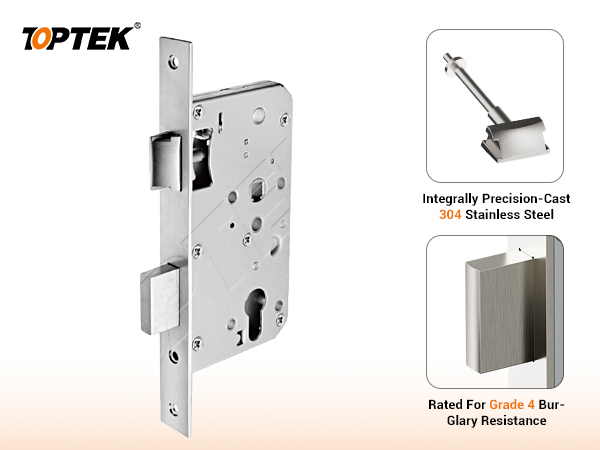
The TOPTEK EN72SL product page identifies a 72 mm-centre sash mortise lock platform. A buyer must still match the required function and full configuration to the current controlled evidence.
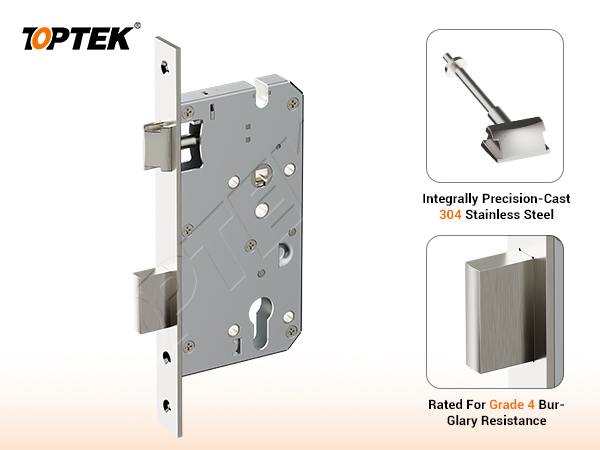
The TOPTEK EN85SL product page provides another series reference. The 72 mm and 85 mm centre dimensions are useful selection data, but neither dimension proves that every backset or function is listed in the same document scope.
Which Changes Require the Document Package to Be Rechecked?
The European Commission’s CE-marking guidance notes that changes to a product, its processes, raw materials or testing can make document revision necessary. A practical buyer or manufacturer should therefore reopen the review when any of the following changes:
- Model number, family code or function suffix
- Backset, centre distance, case or forend dimensions
- Latch, deadbolt, follower, strike or cylinder interface
- Material, grade, thickness, finish or critical component supplier
- Lock function, escape operation or handing arrangement
- Manufacturing process, production site or responsible legal entity
- Standard reference, certificate, DoP or drawing revision
- Door material, fire-door construction or installation condition
Not every change automatically invalidates existing evidence. However, the decision must be documented by the responsible technical or compliance party rather than assumed by sales, purchasing or production personnel.
Buyer Checklist: What Should Be Recorded?
- Destination market and project specification
- Door material, thickness, function and fire or smoke requirement
- Complete lock model and suffix
- Backset, centres, case, forend, strike and interface dimensions
- DoP number, revision and date
- Certificate number, issuing body and complete annex
- Applicable technical specification exactly as stated
- Intended use and declared performance
- CE marking or label reference
- Drawing number and revision
- Sample approval record
- Production change-control owner
Common CE Mortise Lock Approval Mistakes
Approving the Logo Instead of the Product Identity
A CE logo is visible, but product identity is established by the complete traceable evidence chain.
Reading Only the Certificate Cover
Critical model and function limitations may appear in an annex or schedule. Missing pages should produce a hold decision.
Assuming One Centre Distance Means One Approved Family
Locks with identical centres can have different backsets, functions, internal constructions and model references.
Using Fire-Test Language as a Universal Door Approval
Fire performance belongs to a defined specimen, configuration and field of application. It should not be extended to every door or hardware combination without a documented basis.
Using Internal Testing as Third-Party Certification
Internal testing can support quality control and production consistency. It is not a substitute for an official certificate, notified-body activity or third-party test report.
What Project Risks Does Document Mismatch Create?
| Mismatch | Possible project impact | Control action |
|---|---|---|
| Ordered model absent from annex | Submittal rejection or unsupported compliance claim | Hold approval and obtain confirmed scope |
| Drawing revision differs from sample | Door-preparation or installation error | Freeze one approved drawing revision |
| DoP and marking use different identifiers | Loss of traceability | Request corrected controlled records |
| Fire application not connected to door evidence | Unsupported door-set approval | Review the complete door assembly evidence |
| Production change not reviewed | Mass production may differ from the approved sample | Apply documented engineering change control |
What TOPTEK Evidence Can Buyers Review?
TOPTEK publishes an online certification resource centre containing project-evaluation documents for relevant product categories. Buyers should request the current document and complete scope for the exact model under review rather than relying on an archived download or screenshot.
TOPTEK’s EN mortise lock range includes 72, 78 and 85 mm-centre platforms across multiple functions. This product range supports specification matching, but every compliance statement remains subject to the exact model and current controlled evidence.
TOPTEK also uses internal testing for production quality control and consistency checks. These activities support manufacturing control; they must not be described as independent certification.
Product Range and Compliance Boundary
A CE mortise lock supplier may offer several centre distances, backsets, functions, forend options and strikes. Commercial availability does not mean all configurations share identical certification or declaration scope.
Before issuing an RFQ, identify whether the project requires a sash lock, passage latch, deadlock, bathroom function, night latch, roller lock, classroom function or escape-related operation. Then verify the complete function code and application evidence.
For a wider supplier and standard overview, read the TOPTEK EN 12209 mortise lock manufacturer guide. For a fire-door certificate audit, use the separate CE mortise lock certificate checklist.
RFQ Checklist: What Should You Send TOPTEK?
- Project country and required compliance route
- Door type, material, thickness and application
- Fire, smoke, emergency-exit or access-control requirements
- Required lock function
- Backset and centre distance
- Forend, strike, spindle and cylinder-interface requirements
- Existing door-preparation drawing or hardware schedule
- Required DoP, certificate, test or fire-door documents
- Target sample date, annual quantity and finish
- Any approved-brand, model or equivalency requirement
Why Work with TOPTEK?
TOPTEK is a China-based OEM/ODM manufacturer of commercial locks, architectural door hardware and integrated access-control locking solutions. The engineering review begins with the door application, dimensional interfaces and document requirements rather than a generic model substitution.
- EN 12209 mortise lock platforms covering multiple centres and functions
- Technical drawing and specification review before sample approval
- Project-document support for importers, distributors and door manufacturers
- Internal testing used for production control without representing it as third-party certification
- RFQ review connecting product selection, documentation and production release
TOPTEK is your Commercial Door Hardware Reliability Solution.
FAQ: CE Mortise Lock Declaration of Performance
Is a CE certificate the same as a Declaration of Performance?
No. A certificate records the relevant third-party assessment or constancy-of-performance activity where required, while the Declaration of Performance is the manufacturer’s controlled declaration of the identified product’s performance. Buyers should check both documents and their relationship.
What identifiers must match on a CE mortise lock DoP?
The legal manufacturer, product type, exact model or defined scope, intended use, technical specification and declared performance should match the supporting certificate, CE marking information, drawing and ordered product.
Does an EN 12209 DoP approve the complete fire door?
No. It communicates performance for the identified lock product under its applicable route. A fire door must also be supported by door-set test, assessment or classification evidence covering the relevant construction, hardware and installation conditions.
Can a certificate for one backset cover another backset?
Only when the controlled certificate scope, annex or approved technical basis confirms that coverage. Physical similarity or a shared centre distance is not enough to assume that another backset is included.
Which standard edition should a buyer write in the submittal?
Record the edition stated in the applicable controlled certificate and declaration, then confirm the project specification, harmonised reference and transition requirements with the responsible compliance party. Do not silently substitute a newer edition.
What should a buyer send TOPTEK for a document review?
Send the destination market, door application, fire or smoke requirement, complete model or required function, dimensions, hardware schedule, drawing and list of required declarations, certificates or reports.
Conclusion: Approve the Evidence Chain, Not One Document
A CE mortise lock Declaration of Performance is valuable only when it can be traced to the exact product entering the project. The declaration, certificate scope, CE marking information, technical drawing, sample and purchase order should tell the same product story.
When one identifier does not match, place the submission on hold and resolve the gap before sample approval or production release. This approach reduces compliance, installation and procurement risk without extending any certificate beyond its documented boundary.
Request a CE Mortise Lock Document and RFQ Review
Send TOPTEK your door application, complete specification, required function and available compliance documents. Our team can help identify document gaps and prepare the product information needed for quotation and sample review.
Email ivan.he@toptekaccess.com
For a lower-commitment first step, send only your hardware schedule and required centre distance. We will identify the additional information needed before model selection.
TOPTEK: Smart Design. Strong Security.